SAMS Odisha is an online admission system launched by the Government of Odisha for students. Its full name is the Student Academic Management System (SAMS). It is a digital platform through which students can easily apply for admission to various colleges and courses from the comfort of their homes.
The SAMS Odisha Portal has been launched by the Higher Education Department of the Government of Odisha. Its primary objective is to make the admission process simple, transparent, and online, so that students do not have to face any difficulties.
Objective of SAMS Odisha
The primary objective of SAMS Odisha is to provide students with a single platform through which they can apply to multiple colleges using a single form (CAF), thereby making the admission process online and streamlined, ensuring merit-based and transparent selection, and saving both time and money. This renders the entire admission process faster and more reliable.
The SAMS Odisha Portal has been specifically designed for students who wish to pursue further studies after completing their 10th or 12th grade, seek admission to +2 (Higher Secondary), +3 (Graduation), ITI, or Diploma courses, and wish to enroll in government or private colleges within the state of Odisha.
SAMS Odisha is an extremely useful and modern platform for students, making the admission process easy, fast, and transparent. If you wish to pursue your studies in Odisha, the SAMS Odisha Portal is an essential tool for you.
What is SAMS Odisha?
SAMS Odisha is an online admission platform designed to make the student admission process in the state of Odisha both easy and transparent. The full form of SAMS is the Student Academic Management System. This system enables students to apply to multiple colleges and courses from a single platform, thereby making the admission process faster and simpler.
The SAMS Odisha Portal has been launched by the Government of Odisha as a centralized admission system. This means that you do not need to fill out separate forms for different colleges; instead, you can apply to multiple colleges using a single CAF (Common Application Form). The entire process is conducted online and is merit-based. This ensures transparency and fairness in the admission procedure.
The SAMS Odisha Portal is utilized for admission into various types of courses, such as +2 (Higher Secondary), +3 (Graduation Courses), ITI (Industrial Training Institute), and Diploma Courses. In other words, it is an essential platform for students pursuing further studies after completing their 10th and 12th grades.
Key Features of the SAMS Odisha Portal
The SAMS Odisha Portal is a smart and user-friendly platform for students, where the entire admission process has been made online and simplified. Its key features are explained below in easy language:
Online Admission System:
SAMS Odisha is a completely online admission system. Students can apply from the comfort of their homes, without having to visit a college. This saves both time and money.
CAF:
SAMS Odisha CAF (Common Application Form)) is the most important feature of this portal. By filling out a single form, you can apply to multiple colleges. There is no need to fill out forms repeatedly.
College Selection:
With this feature, you can select the colleges and courses of your choice. You can add multiple colleges based on your preferences. Proper choice filling increases your chances of admission.
Merit List:
The SAMS Odisha Merit List is prepared entirely on the basis of merit (marks). Student selection is conducted in a transparent manner. You can easily check the merit list online.
Admission Status:
You can track the status of your application online. You can instantly check whether the status is Selected, Rejected, or Pending. This ensures that you stay informed about every update.
Online Fee Payment:
You can pay admission fees online on the SAMS Odisha Portal. Options such as UPI, Debit Card, and Net Banking are available. You receive an immediate confirmation after making the payment.
All these features of the SAMS Odisha Portal make the admission process for students extremely easy, fast, and transparent. If you wish to pursue your studies in Odisha, understanding the SAMS Odisha admission process is essential for you.
SAMS Odisha Registration Process
If you wish to seek admission through the SAMS Odisha Portal, you must first create an account. The registration process is very simple and can be completed in just a few minutes.
How to Create A New Account?
You can easily complete the SAMS Odisha registration by following the steps given below:
Step 1: First, visit the official website sams odisha govt.in.
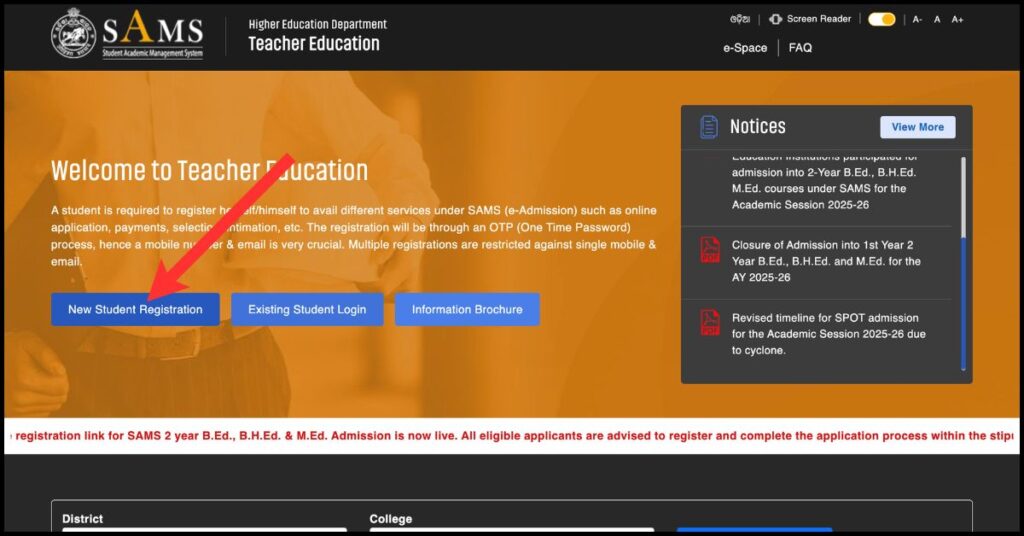
Step 2: Click on the “New Student Registration” option on the homepage.
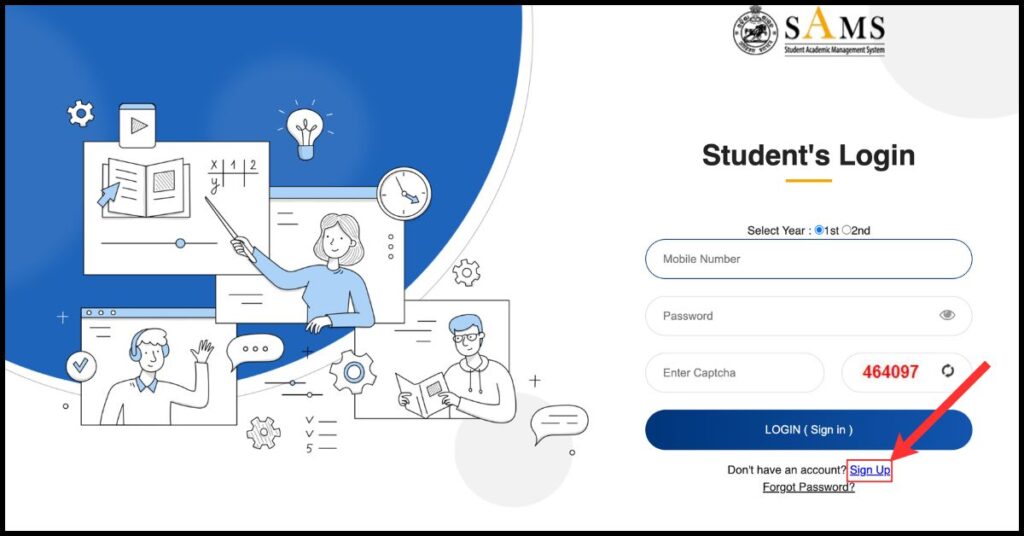
Step 3: You can also click on the “Sign Up” option on the homepage.
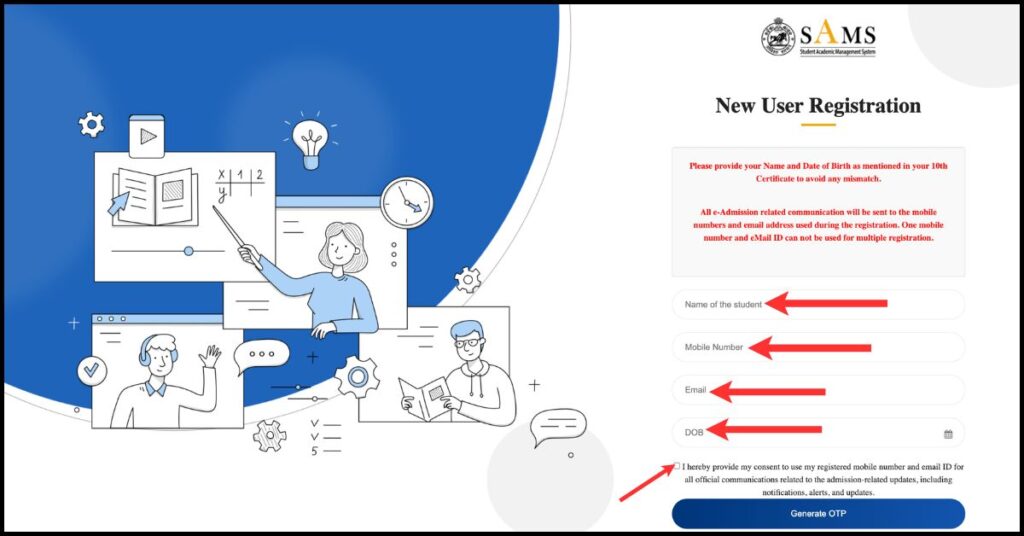
Step 4: Now, fill in your basic details such as Name of the Student, Date of Birth, Mobile Number and Email ID.
Step 5: An OTP (One Time Password) will be sent to the mobile number you provided during registration.
Step 6: Enter that OTP in the designated box. As soon as the OTP is verified, your mobile number will be confirmed.
Please note: Enter the correct mobile number, as all future information will be sent to it.
Step 7: After OTP verification, you will need to set your Login ID and Password.
Step 8: Typically, your Login ID is your mobile number or username.
Step 9: Create a strong password that includes letters, numbers, and special characters.
Step 10: Now registration is completed you can easily login and use all services.
How to Log in to SAMS Odisha?
If you have completed your SAMS Odisha registration, you can now easily log in to SAMS Odisha and access all admission related services. The complete SAMS Odisha login process is outlined below in simple language.
Step 1: First, open the official website of sams odisha gov in.
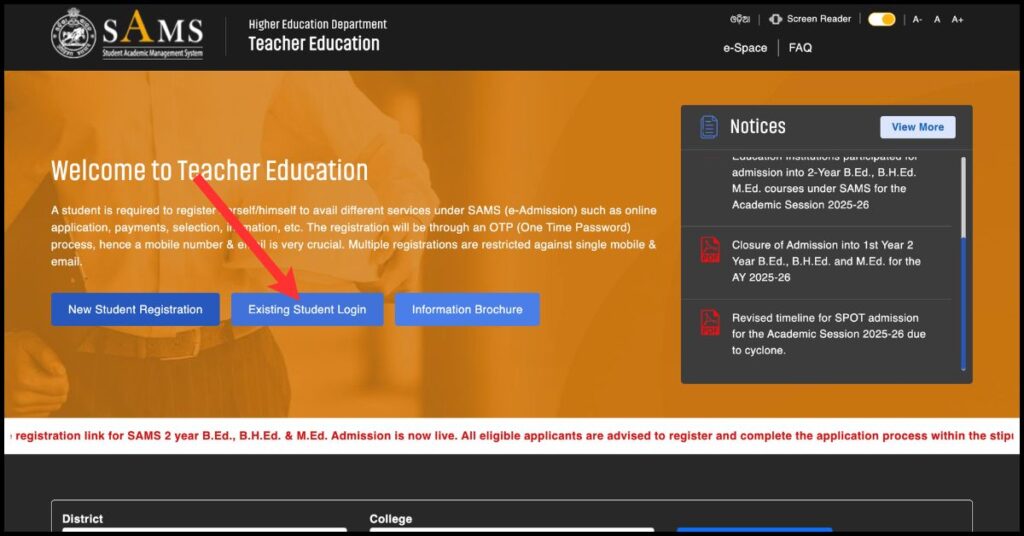
Step 2: Click on the “Existing Student Login” option on the homepage.
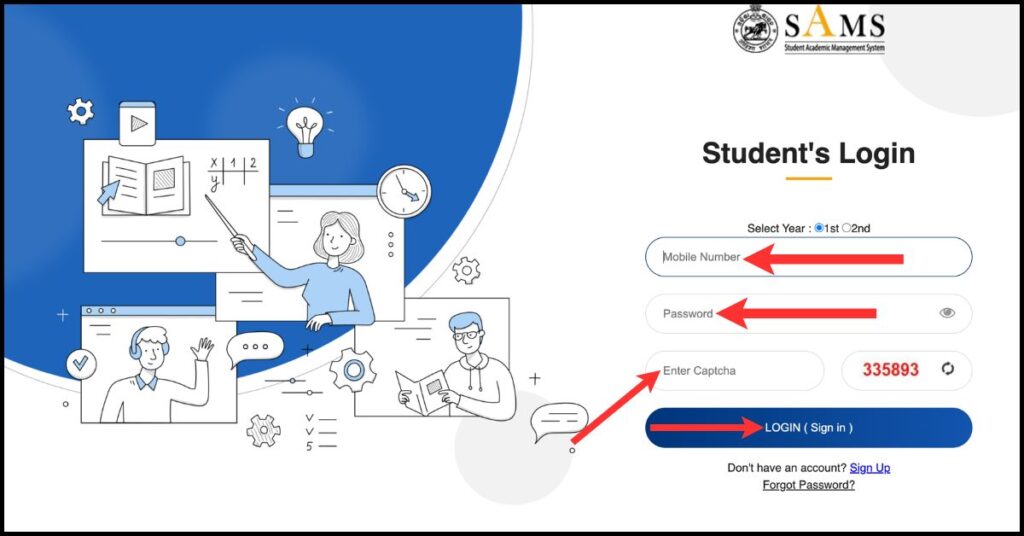
Step 3: Now enter your User ID / Mobile Number.
Step 4: After this, enter your password.
Step 5: Enter the Captcha code displayed on the screen.
Step 6: Now, click on the Login button. Upon completing these steps, you will be logged into your SAMS Odisha Dashboard.
The SAMS Odisha login process is very simple and secure. Once logged in, you can easily perform various tasks such as filling out the CAF Form, selecting a college, viewing the merit list, and checking your admission status. If you encounter any issues while logging in, you can easily regain access by resetting your password.
How Do I Reset My Forgotten Password?
If you have forgotten your password, you can easily reset it:
Step 1: Go to the official page sams odisha govt.in.
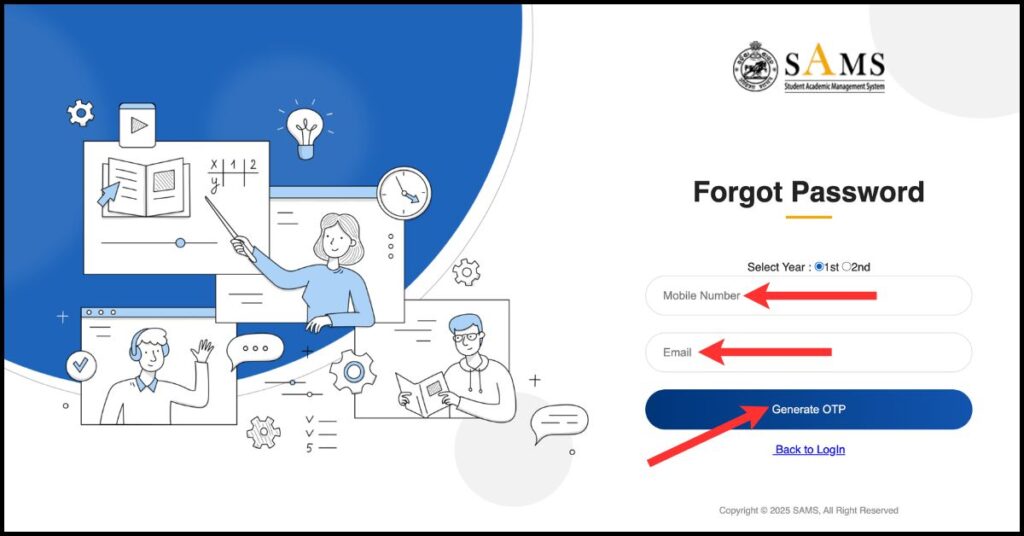
Step 2: Click on the “Forgot Password” option.
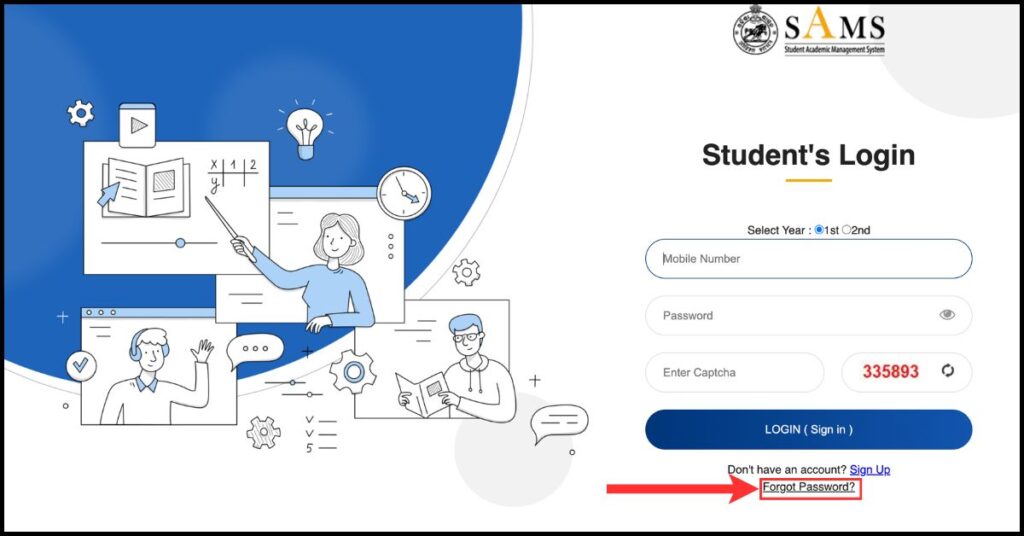
Step 3: Enter your Registered Mobile Number / User ID.